


If a domain redirect is no longer needed, you can easily remove it in cPanel. This ensures visitors access the original website instead of being redirected elsewhere.
1. Log in to your cPanel account.
2. In the Domains section, click on Redirects.
3. Scroll down to the end of the page. Under Current Redirects, locate the domain and click on remove. 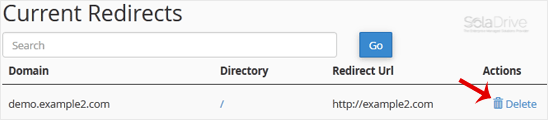
4. For confirmation, click on Remove Redirect once more. 
You have removed the domain redirect in cPanel.